


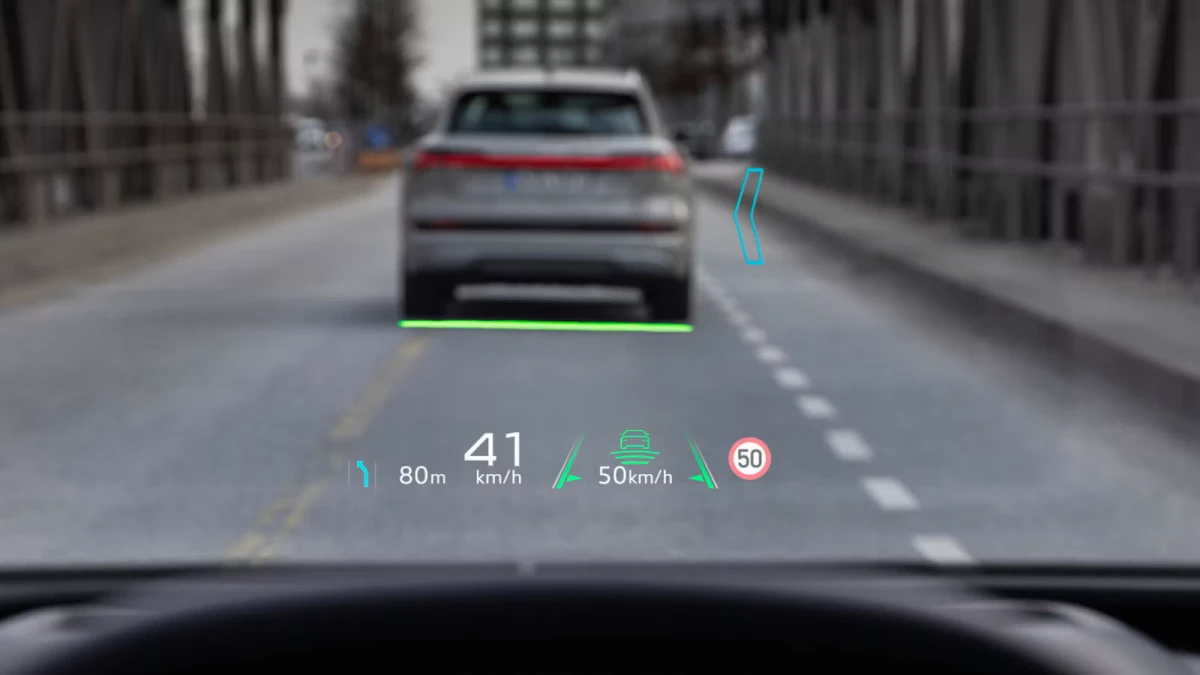
Have you ever noticed how some modern cars display speed, navigation directions and warning messages directly in front of the driver, apparently floating on the windscreen? This feature is called a Head-Up Display (HUD), and it is becoming an increasingly popular technology in modern cars.
Unlike a conventional instrument cluster or infotainment screen, a head-up display allows drivers to access selected information without constantly looking down at the dashboard. It can show vehicle speed, navigation instructions, speed-limit information and certain driver-assistance alerts within the driver’s forward field of view.
But how does this technology actually work? Is the information projected directly onto the road, or does the windscreen act like a screen?
The answer involves a combination of a miniature projector, mirrors, lenses and specially designed glass. Together, these components create what is known as a virtual image, making the information appear as though it is floating ahead of the vehicle.
Let’s understand how a car’s head-up display works, the different types available and whether this technology is worth having.
When Car Screens Go Blank: The Hidden Safety Problem in Modern Cars
What Is a Head-Up Display in a Car?
A Head-Up Display, commonly known as HUD, is a system that projects important driving information into the driver’s forward line of sight.
Depending on the vehicle and the type of HUD, the information can include:
- Current vehicle speed
- Navigation directions and turn-by-turn arrows
- Speed-limit information
- Cruise control settings
- ADAS alerts and warnings
- Incoming call or media information
- Electric vehicle battery and driving information
The main purpose is to reduce the need for drivers to repeatedly look away from the road to check the instrument cluster.
A HUD does not replace the instrument cluster. Instead, it works as an additional information display, presenting selected details where the driver can see them more easily.
How Does a Car Head-Up Display Actually Work?
A head-up display works by generating a small image inside the dashboard and directing its light through a carefully designed optical system towards the windscreen.
The process involves three main stages:
- An image generation unit creates the information.
- Mirrors and lenses direct and adjust the image.
- The windscreen or a separate transparent panel reflects the light towards the driver’s eyes.
The driver’s brain interprets the reflected light as an image appearing beyond the windscreen. This is called a virtual image.
In simple terms, the information is not physically floating in front of the car. It is an optical effect created by the HUD system.
1. A Small Projector Creates the Image
The process begins with a component called the Picture Generation Unit (PGU).
It is generally installed inside the dashboard, where it remains hidden from the driver. The PGU contains the display technology that generates the information shown on the HUD.
Depending on the system, it can use technologies such as LCD or DLP to produce the image.
The vehicle’s electronic systems supply the information, including speed, navigation directions and warning messages. The PGU then converts the selected data into a visual display.
2. Mirrors and Lenses Direct the Light
Once the image is generated, it passes through an optical arrangement of mirrors and lenses.
These components perform an important job. They direct the light towards the windscreen at the correct angle and adjust the image so that it appears at a comfortable viewing distance.
Without this optical arrangement, the projected information could appear too close, distorted or difficult to read.
The system is designed to make the image appear farther away than the actual projection hardware.
3. The Windscreen Reflects the Image
The next important component is the windscreen.
In a windscreen-type HUD, the glass acts as an optical combiner. It reflects a portion of the light coming from the projector towards the driver’s eyes while still allowing the driver to see the road ahead.
This creates the impression that the information is floating beyond the dashboard.
The image is therefore not printed onto the windscreen, nor is the entire windscreen converted into a digital display.
4. The Driver Sees a Virtual Image
The final result is a virtual image positioned within the driver’s forward field of view.
The image appears to be located beyond the windscreen, although it is created by light reflected from the HUD’s optical system.
This is what makes the technology interesting: the driver can see selected information while keeping their head and gaze closer to the normal driving position.
Main Components of a Car Head-Up Display
A HUD may look like a simple projection system, but several components work together to make it function correctly.
| Component | What It Does |
|---|---|
| Picture Generation Unit (PGU) | Creates the information and visual image |
| Display technology | Uses LCD, DLP or another imaging technology to generate the picture |
| Mirrors | Direct the light along the required optical path |
| Lenses | Adjust the image size, focus and viewing characteristics |
| Windscreen or combiner | Reflects the image towards the driver’s eyes |
| Control electronics | Manage the displayed information, brightness and system settings |
| Driver viewing area (eyebox) | Defines the area from which the driver can clearly see the projected image |
The quality of the final display depends on how well these components work together.
Dead Key Fob Battery? Here’s How to Start Your Car Without Replacing It
Why Do Some Cars Need a Special Windscreen for HUD?
This is one of the lesser-known aspects of head-up display technology.
A conventional laminated windscreen contains two layers of glass with a plastic interlayer between them. When light from a HUD reaches the windscreen, reflections can occur from more than one surface.
This can create an unwanted effect known as ghosting.
Ghosting happens when the driver sees two slightly separated versions of the same projected information. For example, the speed displayed on the windscreen may appear doubled or blurred.
To reduce this problem, some HUD-compatible windscreens use a specially designed wedge-shaped plastic interlayer. Its optical properties help align the reflections and reduce the appearance of duplicate images.
This is also why replacing a windscreen on a car equipped with a factory HUD requires additional care.
A normal replacement windscreen may not have the optical characteristics required by the HUD system. Owners should therefore check for HUD compatibility before replacing the glass.
What Is the Eyebox in a Head-Up Display?
Another important term associated with HUD technology is the eyebox.
The eyebox is the three-dimensional viewing area within which the driver can see the projected information clearly.
Drivers have different heights and seating positions. If the projected image were visible from only one exact eye position, the system would be inconvenient to use.
The eyebox gives the driver some freedom to adjust their seat and head position while keeping the display visible.
Many vehicles also allow drivers to customise the HUD settings.
| HUD Setting | Purpose |
|---|---|
| Display height | Moves the information higher or lower on the windscreen |
| Brightness | Adjusts visibility in sunlight and at night |
| Display position | Fine-tunes the location of the projected information |
| Content selection | Allows certain information to be displayed or hidden |
| Automatic brightness | Adjusts display intensity according to surrounding light conditions |
The objective is to make the information easy to read without distracting the driver.
Types of Head-Up Displays Used in Cars
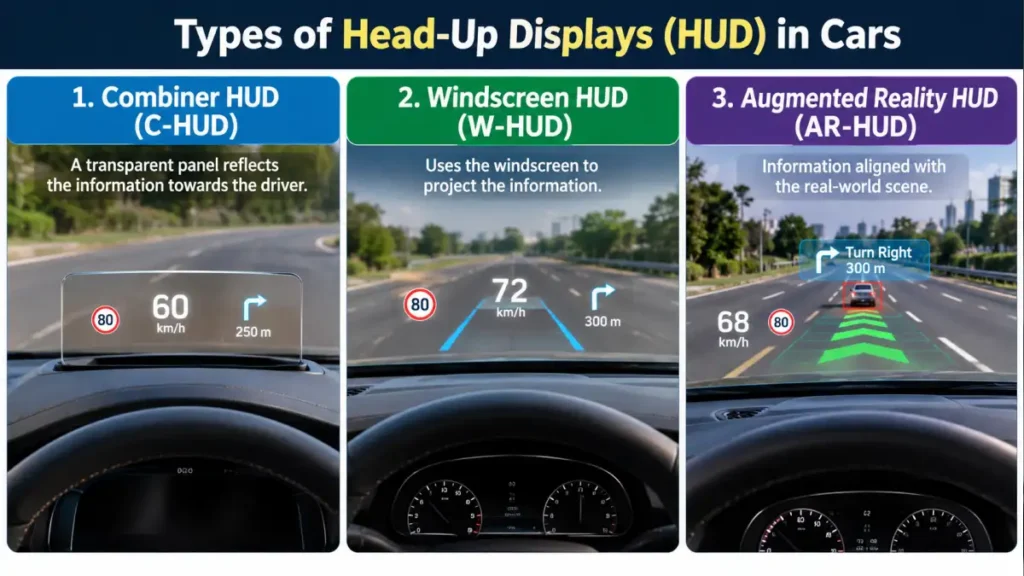
Not all head-up displays work in exactly the same way. Automotive HUD technology has evolved from relatively simple transparent panels to systems that can align digital graphics with the real driving environment.
The three main categories are:
1. Combiner Head-Up Display (C-HUD)
A combiner HUD uses a separate transparent reflective panel positioned above the dashboard.
The projector sends the image towards this panel, which reflects it towards the driver.
This design does not depend on the windscreen itself to act as the primary reflective surface. It can also be easier to integrate into vehicles that do not use a dedicated HUD-compatible windscreen.
However, the separate panel has physical limitations. The image may appear closer to the driver, and the display area can be smaller than that of more advanced windscreen-based systems.
2. Windscreen Head-Up Display (W-HUD)
A windscreen HUD uses the vehicle’s windscreen as the optical combiner.
Instead of displaying information on a separate transparent panel, the system reflects the projected image from the windscreen itself.
This creates a more integrated appearance, with the information seemingly floating ahead of the dashboard.
Windscreen HUDs are generally more sophisticated and require the windscreen to meet specific optical requirements.
3. Augmented Reality Head-Up Display (AR-HUD)
An Augmented Reality Head-Up Display takes the technology a step further.
A conventional HUD usually displays information in a fixed area of the driver’s view. An AR-HUD can position digital graphics so that they appear aligned with elements of the real-world driving scene.
For example:
- Navigation arrows can appear to follow the road or indicate an upcoming turn.
- Lane guidance graphics can appear aligned with the road markings.
- Warning graphics can highlight a vehicle or potential hazard ahead.
- Driver-assistance information can appear closer to the area where it is relevant.
To achieve this, the system uses information from cameras, vehicle sensors, navigation systems and other electronic components.
The graphics must be positioned accurately according to the driver’s viewpoint, vehicle movement and the distance to objects ahead.
This makes AR-HUD systems more complex than conventional head-up displays.
HUD vs AR-HUD: What Is the Difference?
| Feature | Conventional HUD | Augmented Reality HUD |
|---|---|---|
| Display location | Fixed area in driver’s view | Can align graphics with the real-world scene |
| Speed display | Yes | Yes |
| Navigation | Basic arrows and directions | Graphics can appear aligned with the road |
| Road guidance | Limited | More advanced visual guidance |
| Hazard highlighting | Basic warnings | Can visually highlight relevant objects |
| Technology | Projector and optical system | Projector, optics, sensors, cameras and positioning data |
| Complexity | Relatively lower | Higher |
| Cost | Generally lower | Generally higher |
The key difference is how the information is presented. AR-HUD does not simply show more information; it attempts to place that information in a context that relates to what the driver is seeing.
Advantages of a Head-Up Display in Cars
A head-up display is more than a premium-looking dashboard feature. It can make certain driving information easier to access.
1. Less need to look down
The driver can check speed and selected information without repeatedly looking at the instrument cluster.
2. Navigation becomes easier to follow
Turn-by-turn instructions can be displayed closer to the driver’s normal line of sight.
3. Important warnings are easier to notice
Compatible vehicles can display selected ADAS alerts and warning messages in the HUD.
4. Better integration with modern vehicle technology
HUD systems can bring information from navigation, driver assistance and vehicle electronics into one display area.
5. A cleaner driving experience
Drivers can access useful information without relying entirely on the central infotainment screen.
However, a HUD does not eliminate distraction or guarantee safer driving. Its effectiveness depends on the information displayed, system design and driver behaviour.
Disadvantages of Head-Up Displays
Despite their benefits, head-up displays also have a few limitations.
| Disadvantage | Why It Matters |
|---|---|
| Higher vehicle cost | Factory HUD systems add hardware and integration costs |
| Special windscreen requirement | Some vehicles need HUD-compatible replacement glass |
| Ghosting | Poor optical alignment can create duplicate images |
| Sunlight visibility | Bright ambient light can make some displays harder to read |
| Polarised sunglasses | Certain HUDs may become difficult to see through some polarised lenses |
| Driver seating position | The image may not be visible if the driver’s eyes are outside the designed eyebox |
| Information overload | Too many graphics can become distracting |
The quality of a HUD can vary significantly between vehicles. A well-designed system should prioritise essential driving information instead of filling the driver’s view with unnecessary graphics.
Can You Install an Aftermarket Head-Up Display in Any Car?
Yes, aftermarket HUD devices are available for cars that do not have a factory-fitted system.
These devices generally sit on top of the dashboard and display information on a small transparent panel or use a reflective surface to show information towards the driver.
Depending on the product, they can obtain vehicle data through an OBD-II connection or use GPS information.
Common features include:
- Vehicle speed
- Engine RPM
- Battery voltage
- Coolant temperature
- Speed warnings
- GPS-based driving information
However, aftermarket devices should not be confused with factory-integrated windscreen HUDs.
Their image quality, brightness, viewing distance and available information can vary. They may also lack the integration with navigation and driver-assistance systems found in more advanced factory-fitted displays.
How to Maintain Leather Car Seats in India: Cleaning, Heat Protection and Tips to Prevent Cracks
Are Head-Up Displays Worth Having in a Car?
For drivers who frequently travel on highways or use navigation, a head-up display can be a useful feature.
Being able to check speed and navigation instructions without repeatedly looking down can make the driving experience more convenient.
However, not all HUDs offer the same experience. A basic combiner display and an advanced augmented-reality HUD are very different technologies.
If you are buying a new car, look beyond the presence of a HUD badge in the feature list. Check its brightness, readability, display size, customisation options and compatibility with the vehicle’s navigation and driver-assistance systems.
A well-executed HUD can be a genuinely useful feature. A poorly implemented one may become something you rarely use.
Conclusion
Head-up displays are a good example of how automotive technology is changing the way drivers interact with their cars.
What initially looks like a simple speed projection is actually a carefully engineered combination of image generation, mirrors, lenses and specialised optical surfaces.
As the technology develops, conventional HUDs are making way for more advanced augmented-reality systems that can place navigation and warning graphics in context with the road ahead.
For now, the biggest value of a HUD is convenience: keeping essential information within the driver’s forward field of view. And as cars become increasingly connected and software-driven, this technology is likely to play an even bigger role in the future cockpit.

2 Comments
Pingback: Solid-State Batteries Explained: The Future of Electric Cars
Pingback: Suzuki Ignis Returns as a New Compact Electric Car